USB4 vs Thunderbolt 4: Real-World Bandwidth, Daisy-Chaining Limits, Cable Certification, and What Works with Your Laptop

Choosing between NVMe and SATA SSDs for a gaming PC affects load times, responsiveness, longevity, and total build cost. This expert guide explains how interface, controller design, NAND type, and platform features change real game performance, so you can buy the right drive without overspending.
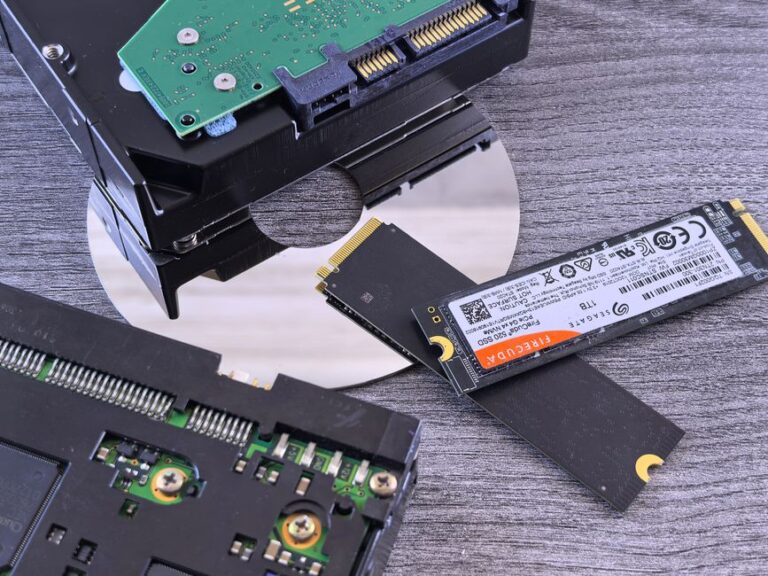
SATA SSDs use the AHCI protocol over the SATA interface, which was designed for hard drives. NVMe SSDs use the PCIe interface and a protocol built for parallel workloads and low latency.
For gamers, this means SATA drives have lower peak throughput and higher latency, while NVMe drives deliver much higher sequential and random performance. However, not every game benefits equally.
Modern titles mix large asset reads, many small random files, and decompression. The storage path competes with CPU, memory, and GPU, so the fastest drive is not always the fastest load screen.
NVMe SSDs excel at sequential reads and can also serve many queues with low latency. SATA SSDs are limited by the SATA link and older command depths. Random I/O at small block sizes is often what gates scene and level loads.
In practice, the difference between a good SATA SSD and a midrange NVMe SSD may feel modest in some games, yet noticeably snappier in titles that stream assets constantly. The more parallel file requests a game makes, the more NVMe helps.
Game load time is a pipeline: storage fetch, decompression, CPU preparation, and GPU upload. A drive upgrade helps only if storage is the current bottleneck.
Older titles that were built around hard drives often show small differences between SATA and NVMe SSDs. Newer engines that issue parallel reads and use modern I/O APIs benefit more from NVMe bandwidth and lower latency.
Windows features such as GPU-accelerated decompression and asset streaming can further shift the benefit toward faster NVMe drives in supported games. Check each game’s technical notes to confirm support.
Open-world and large map games stream assets as you move. NVMe drives can cut pop-in and reduce micro-stutters when the engine pulls many assets at once.
SATA SSDs still perform well compared to hard drives, but they are more likely to hit bandwidth and queue depth limits during intense streaming moments.
On many popular PC games, switching from SATA SSD to mainstream NVMe trims some seconds but not an order of magnitude. Gains vary by engine, compression method, and CPU.
Expect bigger wins on engines tuned for parallel I/O and on systems with enough CPU cores to decompress and prepare assets without becoming the new bottleneck.
Longevity depends more on NAND quality, controller design, firmware, and thermal conditions than on the interface alone. Both SATA and NVMe SSDs can be highly reliable when built well.
Vendors rate endurance in TBW (terabytes written) and often provide a warranty based on years and TBW. Always check the product sheet rather than assuming endurance from capacity.
Gaming workloads are read-heavy. Most players will not approach TBW limits during a normal upgrade cycle, but patch-heavy titles and frequent installs increase writes.
TLC NAND typically offers better sustained performance and endurance than QLC, at a higher price. QLC can be fine for budget builds, but it is more sensitive to heavy write workloads.
Most consumer SSDs use a dynamic SLC cache to accelerate short bursts. When the cache is exhausted, write speeds drop to the native TLC or QLC rate, which can be noticeable during massive updates.
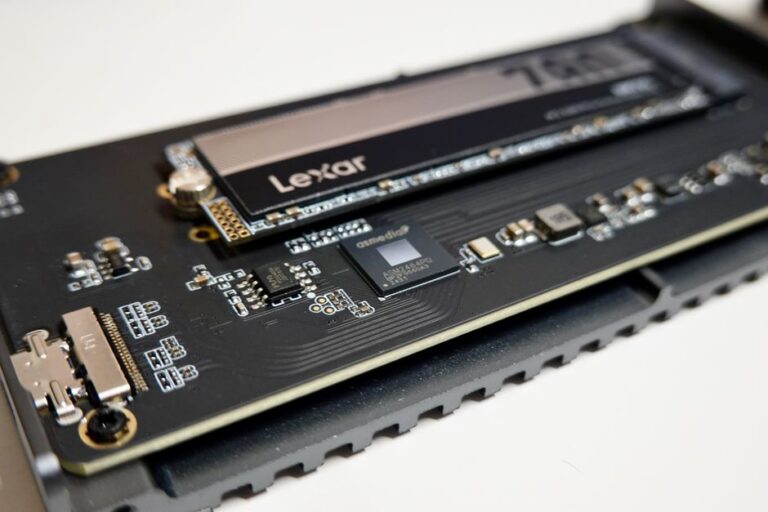
NVMe drives run hotter because they push more bandwidth through compact M.2 packages. Under heavy writes, they can throttle to protect themselves.
Use motherboard heatsinks or slim NVMe heatsinks to maintain performance. Ensure case airflow reaches M.2 areas around the CPU and GPU.
SATA SSDs in 2.5-inch form factor dissipate heat more easily and rarely throttle in gaming scenarios.
Before buying, review your motherboard manual. Some M.2 slots share lanes with SATA ports, and populating them can disable specific SATA connectors.
PCIe generations matter. PCIe 3.0 NVMe is already fast for gaming. PCIe 4.0 improves headroom. PCIe 5.0 pushes peak throughput even further but demands stronger cooling.
Check physical fit for M.2 lengths (often 2280) and confirm a free slot. For small form factor builds, consider cable routing and airflow around the GPU backplate.
Use modern drivers and keep firmware updated for stability and performance. Some features require up-to-date Windows versions and supported GPUs and CPUs.
File system settings, write caching, and power plans can influence burst performance. Balanced or High Performance plans often deliver more consistent results than aggressive power saving.
For most gaming PCs, a quality 1 TB or 2 TB SSD is the sweet spot. Choose capacity based on your library size, patches, and capture footage needs.
If the choice is between a small high-end NVMe and a larger midrange SSD, capacity often wins for practical gaming use, provided the drive is reputable.
Allocate budget for a strong GPU and adequate RAM first. Storage should not starve the core performance of the build.
Pick a SATA SSD if your motherboard lacks free NVMe slots or if you can secure a larger capacity at a lower price with minimal impact on load times in your games.
SATA is excellent for secondary game libraries, screenshots, and general storage. It also avoids lane sharing complexities on some platforms.
Choose NVMe if you play modern titles that stream assets heavily, mod extensively, or move large game files often. It also future-proofs for newer engines.
A balanced midrange NVMe with TLC NAND and DRAM is a strong default. PCIe 4.0 models provide extra headroom without the thermal demands of many PCIe 5.0 drives.
Entry-level gaming PC: A reliable SATA SSD or DRAM-less NVMe with HMB is adequate. Prioritize capacity and a reputable brand with clear warranty terms.
Midrange gaming PC: TLC NVMe with DRAM, 1–2 TB, motherboard heatsink, and updated firmware. Great balance for modern titles and modding.
High-end or creator-gamer hybrid: PCIe 4.0 or 5.0 NVMe with strong controller, ample cooling, and 2 TB or larger. Consider a second SSD for scratch and capture.
Leave 10–20 percent free space if possible to help the controller manage wear and performance. Avoid filling to 100 percent for long periods.
Reduce redundant writes by consolidating game libraries and disabling unnecessary background tasks that churn caches during play.
If you want the best overall responsiveness and future-ready performance, choose a good TLC NVMe SSD with adequate cooling. It improves load consistency, asset streaming, and file operations.
If you are on a strict budget or need more capacity for the same money, a quality SATA SSD still delivers fast game loads compared to hard drives and may be the smarter buy.
Match your choice to your games, platform features, and budget. Prioritize capacity and reliability, then step up to NVMe where it meaningfully benefits your workload.
No. Many games see modest differences because CPU and decompression can be the bottleneck. NVMe helps more in engines that issue many parallel reads and stream assets aggressively.
PCIe 4.0 offers sensible headroom and mature thermals for most gamers. PCIe 5.0 can be faster on paper but often needs stronger cooling, and many games do not scale linearly with peak bandwidth.
DRAM improves metadata handling and consistency under mixed workloads. For frequent installs, mods, and large patches, a DRAM-equipped SSD is preferable. DRAM-less with HMB is fine for lighter use.
It can under sustained writes or in hot cases. A motherboard M.2 heatsink or a slim aftermarket heatsink is recommended to maintain peak performance.
Check the manufacturer’s specification sheet for TBW and warranty length, and pick a capacity and NAND type that match your usage. For most gamers, normal play will not exhaust endurance within the warranty period.